- bug #3902 Cannot browse when table name contains keyword "call" + center loading indicator for navigation refresh, related to bug #3920 - bug #3925 Table sorting in navigation panel is case-sensitive - bug #3915 Import of CSV file (Replace table data with file) with duplicate values - bug #3907 undefined variables, function parameter problems - bug #3898 Structure not refreshed after column drop - bug #3926 View is not updatable - bug #3919 PropertiesIconic not honored - bug #3930 Databases to choose for specific privileges show up escaped - bug #3910 Export database with empty table as a php array, does not produce valid PHP - bug #3936 Query profiler chart not loading from SQL Query page - bug #3946 Missing CSV import option "Do not abort on INSERT error" - bug #3943 Missing Operations>Table options>AUTO_INCREMENT - bug Missing CREATE DATABASE statement when exporting at database level - bug #3924 Show warning when CSV file does not contain data for all columns - bug #3947 Missing Sql Query after modify structure - bug #3948 Server export problems - bug #3917 CountTables directive is deprecated
- Some bugs fixed - Added possibility to customize authored Subtitles position ('Preferences'/'Authoring') - Added 'AVS Audio Source Filter' in 'Preferences'/'AviSynth' - Renamed 'AVS Source Filter' to 'AVS Video Source Filter' in 'Preferences'/'AviSynth' - Replaced 'QuEnc CBR 1-pass' Video Encoding Profile with 'FFmpeg CBR 1-pass' - Replaced QuEnc with FFmpeg for AC3 and MP2 encoding (QuEnc has been actually removed from AVStoDVD package) - Added 'Use FFmpeg HQ Options' in 'Title Edit'/'Video' - Added possibility to resize Jobs List window + Added Jobs List save and load routines + Added support of OpenType fonts for labels in 'DVD Menu Editor' + Added possibility to customize Normalization peak level in 'Preferences'/'Audio' + Added *DBPATH command to HCenc ini file - Improved titles media properties info management - Improved SRT subtitles parsing routine - Improved ASS to SRT conversion routine - Improved log activity (reference to Help/FAQs section) + Improved AviSynth Script generation routine (AddBorders now uses only mod 2 values) - Removed 'Save Log file in Output Folder at runtime' option in 'Preferences'/'Misc' (now it always saved)
1. Changed: Updated Polish translation (thanks Janusz Grzybek). 2. Changed: madVR in full screen exclusive mode could prevent Theater View from showing properly. 3. Fixed: When zooming into an item in a Theater View flow list, the animation could appear jerky in some cases. 4. Fixed: Instructions shown over Theater View could flicker. 5. Fixed: Child wizard dialogs, like used in Options > Remote Control, weren't supporting the OK and Cancel buttons properly in some cases. 6. Changed: Radio buttons will use multiple lines for their text when necessary instead of truncating the text (helps with large font sizes). 7. Fixed: Video conversion could use file path settings from the audio converter. 8. Changed: Updated the French language translation (thanks rlebrette). 9. Fixed: If a connection to a Library Server was sporadic, it could lead to cases where a link to external cover art could be lost. 10. Fixed: Mono ALAC files were not being parsed or played correctly. 11. Fixed: DLNA slideshow push. The transition from first to second image in a playlist of images was not happening on the timer properly. This change may also make it more likely to work on devices that were having trouble with the slideshow mode.
I hopefully fixed a bug that caused the gadgets to crash at startup or prevented gadgets to show up. Also made autostart more stable. Fixed a bug that prevented flash gadgets to work. Updated outdated gadgets and added a few. Added silent install support (see FAQ).
Если вам надоело скучное меню, которое выскакивает при нажатии на кнопку "Пуск" ( или на значок Windows ), то думаю вам подойдет данная программа. Она разрабатывалась очень тщательно, после ее установки приложение будет использовать для удобной навигации вашу визуальную память, рефлексы и прочие другие черты, таким образом передвижение по меню будет максимально комфортным. В целом программа понятна даже для начинающих пользователей, а к тому же имеется Русская поддержка, думаю сможете разобраться сразу после запуска, но перед этим не забываем скачать Start Menu 7 по прямой ссылке - быстро и бесплатно с нашего проекта.
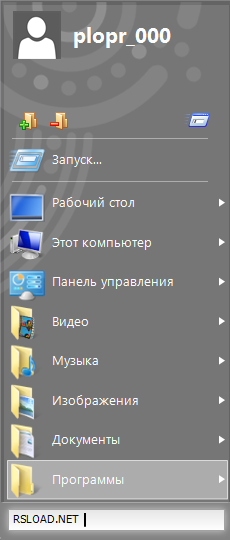
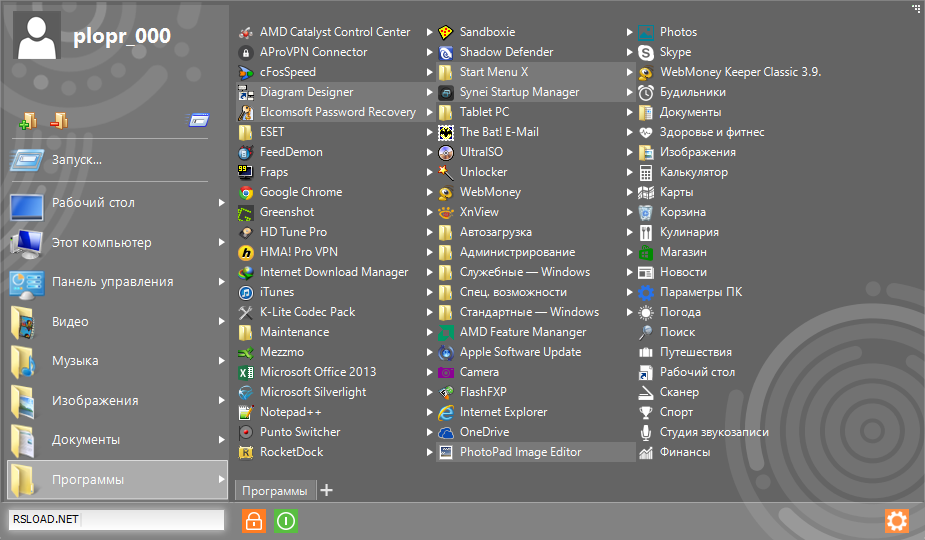
Сразу после запуска утилиты меню Пуск полностью преобразиться, собственно на интерфейсе это наглядно видно, именно так оно будет выглядеть, конечно же я ничего не настраивал, но вы вполне можете. Если верить автору Start Menu 7, его разработка продумана до всех мелочей, именно это и позволит вам комфортно перемещаться и настраивать приложение под свой вкус. Интерфейс мне лично понравился, я бы даже может оставил, но меня вполне устраивает мое меню, никаких неудобств не испытываю.
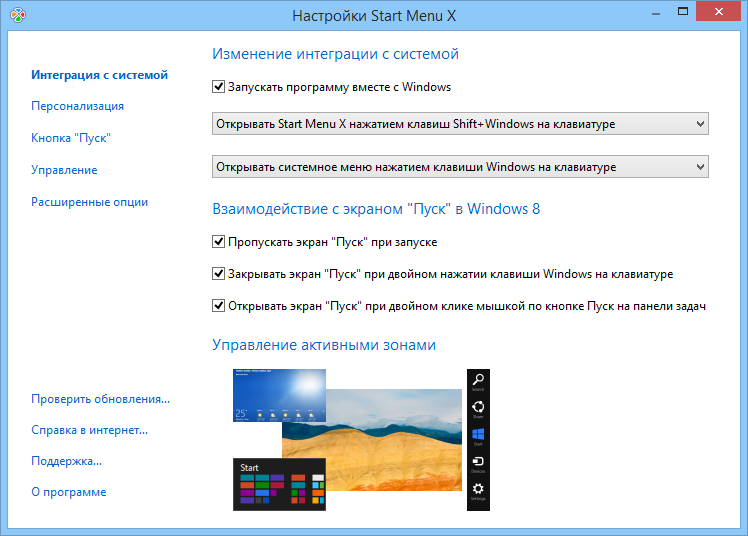
Start Menu 7 с помощью определенного сочетания клавиш позволит вам запускать различные программы из меню, что тоже удобно, не обязательно при этом пользоваться мышью, имеется встроенный поисковик по системе Google, набираете текст, жмете на сочетание клавиш и вот вам результат. Также не забываем о том, что при установке новых программ, старые будут на том же месте, смещаться они не будут, вот это радует конечно.
Также вы сможете быстро включать, выключать и конечно же перезагружать систему, можно также изменять масштаб шрифта, если кто-то плохо видит, то думаю оценят такую фишку. Добавить больше о Start Menu 7 ничего не могу, пользуйтесь и наслаждайтесь.
Скачать бесплатно; рабочий key(ключ), RUS (русификатор), активация, serial (серийный номер), crack в комплекте; без регистрации по прямой ссылке бесплатно!